A Voice Note Started It. Claude's Own Morning Briefing Followed It Up.
18 Jul 2026
18 Jul 2026 by Luke Puplett - Founder

We keep a running list of things Claude does with Zipwire's data that we never explicitly built. This is the latest one, and it spans three separate surfaces - WhatsApp, a morning briefing, and a follow-up conversation - without a single line of glue code connecting them on our end.
It starts with a voice note
The request in this story wasn't created by opening Zipwire. It was created by sending a voice note to Zipwire's WhatsApp assistant.
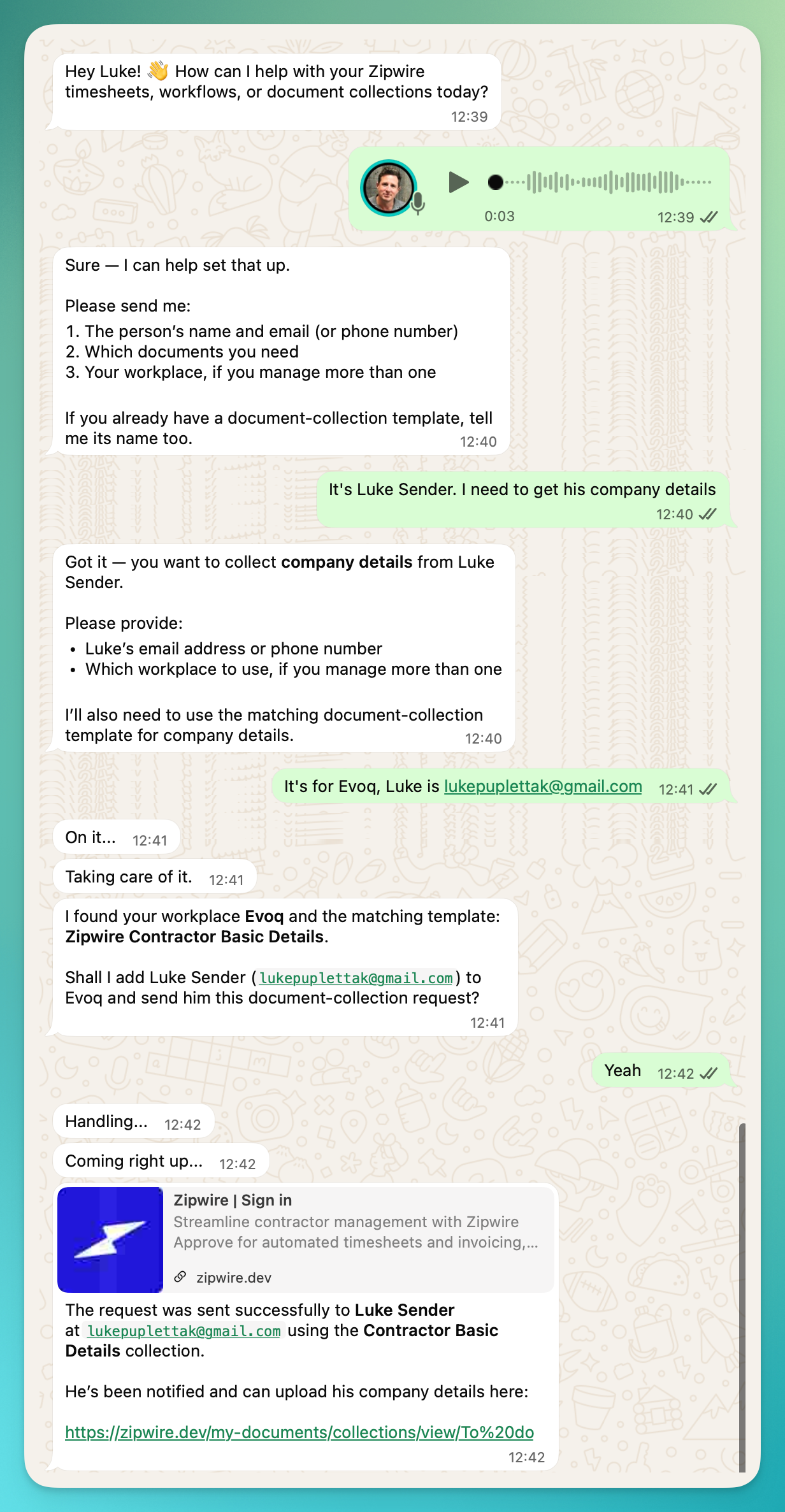
A three-second voice note - "It's Luke Sender, I need to get his company details" typed out afterwards for clarity - was enough for the assistant to ask two follow-up questions (an email address, which workplace to use), match an existing template called Zipwire Contractor Basic Details by name, confirm before sending, and deliver the request. No web page, no admin console, no typing out a form. Just a conversation, the way you'd ask a colleague to sort it.
Then Claude's own morning briefing picked it up
Claude Desktop has its own daily briefing - a summary it puts together each morning from whatever it has access to. We didn't write that feature. We didn't even know it would pick up Zipwire until it did. The day we connected Zipwire over MCP, outstanding Zipwire admin started turning up in it, unprompted, next to everything else Claude already tracks.
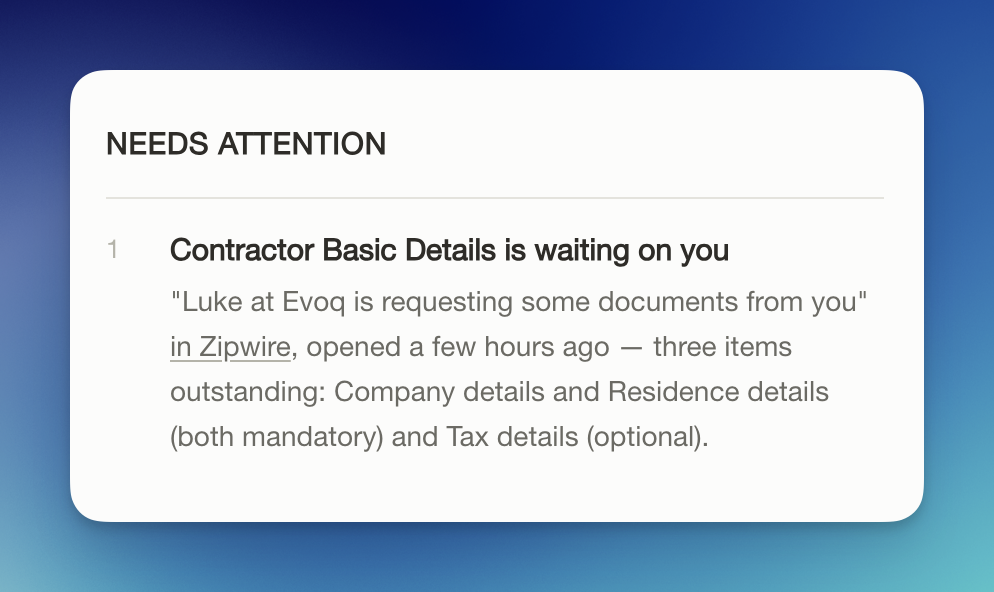
In this example, the briefing's "Needs attention" section lists a Zipwire collection request by name - "Contractor Basic Details is waiting on you" - along with who sent it, when it was opened, and exactly which sections are still outstanding: Company details and Residence details (mandatory), Tax details (optional). Nobody asked Claude to check Zipwire that morning. It was just one more thing on the list, described as plainly as an overdue email or a meeting that needs prep.
Ask it, and it doesn't just point you at the form
The briefing item is a summary. Follow up on it, and Claude goes and reads the actual collection request - not a cached description of it, the live thing - and comes back with the real requirements.
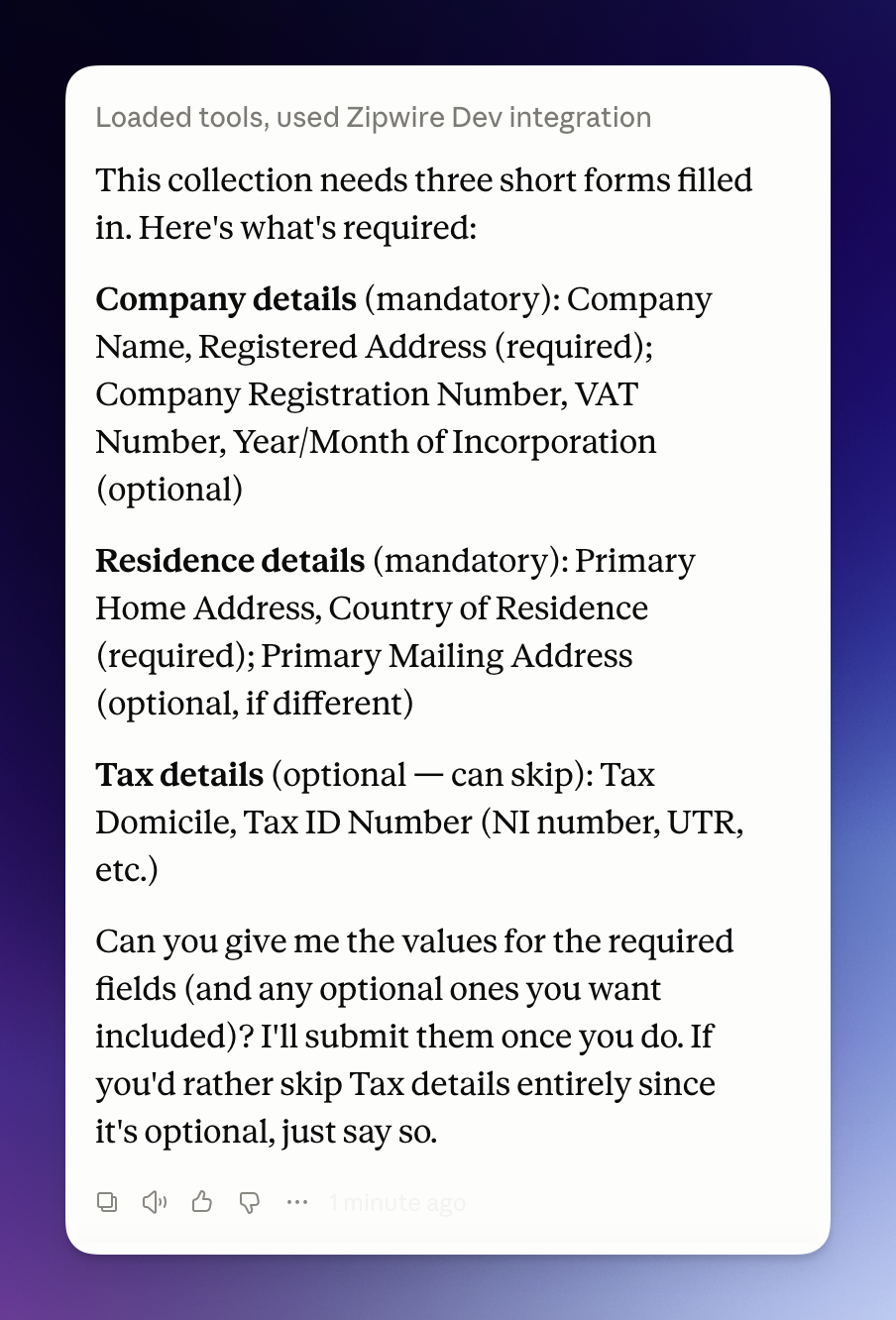
It breaks the request down field by field: Company Name and Registered Address as required, Company Registration Number and VAT Number as optional; Primary Home Address and Country of Residence as required; the whole Tax details section marked skippable. Then it offers to do something more useful than reciting a list - fill in and submit the collection itself, as soon as it has the values, and it says outright that Tax details can be skipped if you'd rather not answer.
That's a real admin task - the kind that normally means opening a portal, hunting for the right form, and re-reading which fields are actually mandatory - handled inside a conversation you were already having about your morning.
Why we're pointing at this instead of claiming it
The honest version of this story is that Zipwire's contribution here is almost entirely absence of friction, not a feature. We didn't design a WhatsApp assistant flow specifically for voice notes, a briefing integration, a notification hook, or a "things to do" widget. We shipped a WhatsApp bridge and an MCP connector that both give Claude read and write access to real collection requests, and Claude's own general-purpose tooling did the rest across all three surfaces - because from its side, a Zipwire collection request looks like any other task with a name, a sender, a deadline, and required fields. It doesn't need to know it's talking to a staffing platform. It just needs the data to be legible.
That's the same idea behind everything we've written about self-describing proof and the flags Claude finds in a timesheet review: we're not trying to teach an assistant our vocabulary. We're trying to make sure the underlying data holds up on its own, so whatever's reading it - a briefing feature we didn't ask for, a different AI entirely, a human three years from now - gets something legible without a Zipwire-specific decoder ring.
Worth being honest about the human-in-the-loop part
Claude offering to submit the collection isn't the same as Claude submitting it. In this example it explicitly asks for the actual values first and says it will wait for them - it doesn't invent a company registration number to look useful. That distinction matters more here than almost anywhere else in Zipwire: these are the fields that end up on contracts, tax records, and right-to-work checks. An assistant that's fast about admin is only worth having if it's also honest about what it doesn't know yet.
Try it yourself
If you're already using Zipwire with Claude Desktop, there's nothing new to switch on - this is just what happens once you're connected. If you haven't set it up, add Zipwire as an MCP connector at https://zipwire.io/api/v1/mcp; full steps are in the Using Zipwire with Claude guide. Whether your morning briefing picks up outstanding Zipwire requests the same way is between you and Claude Desktop's own settings - we just supply the data.
That's lovely and everything but what is Zipwire?
Zipwire Collect handles document collection for KYC, KYB, AML, RTW and RTR compliance. Used by recruiters, agencies, landlords, accountants, solicitors and anyone needing to gather and verify ID documents.
Zipwire Approve manages contractor timesheets and payments for recruiters, agencies and people ops. Features WhatsApp time tracking, approval workflows and reporting to cut paperwork, not corners.
Zipwire Attest provides self-service identity verification with blockchain attestations for proof of personhood, proof of age, and selective disclosure of passport details and AML results.
For contractors & temps, Zipwire Approve handles time journalling via WhatsApp, and techies can even use the command line. It pings your boss for approval, reducing friction and speeding up payday. Imagine just speaking what you worked on into your phone or car, and a few days later, money arrives. We've done the first part and now we're working on instant pay.
All three solutions aim to streamline workflows and ensure compliance, making work life easier for all parties involved. It's free for small teams, and you pay only for what you use.